How to reset player data on your ARK Server
Resetting player data on your ARK server can be useful when you want players to start fresh, especially after major updates, balance changes, or server-wide resets.
It can also help fix issues related to a specific player’s progress, character data, or corrupted profile files.
Always create backups before deleting any player files.
You may need the player’s Steam ID to find the correct file.
If needed, see this guide: How to find your Steam ID or Epic ID
Step 1) Open your console, select your server, and stop it using the STOP button.
Once the server is stopped, open FILE MANAGER from the left-side menu under SERVER CONTROLS.

Step 2) Go to:
ShooterGame > Saved > SavedArks
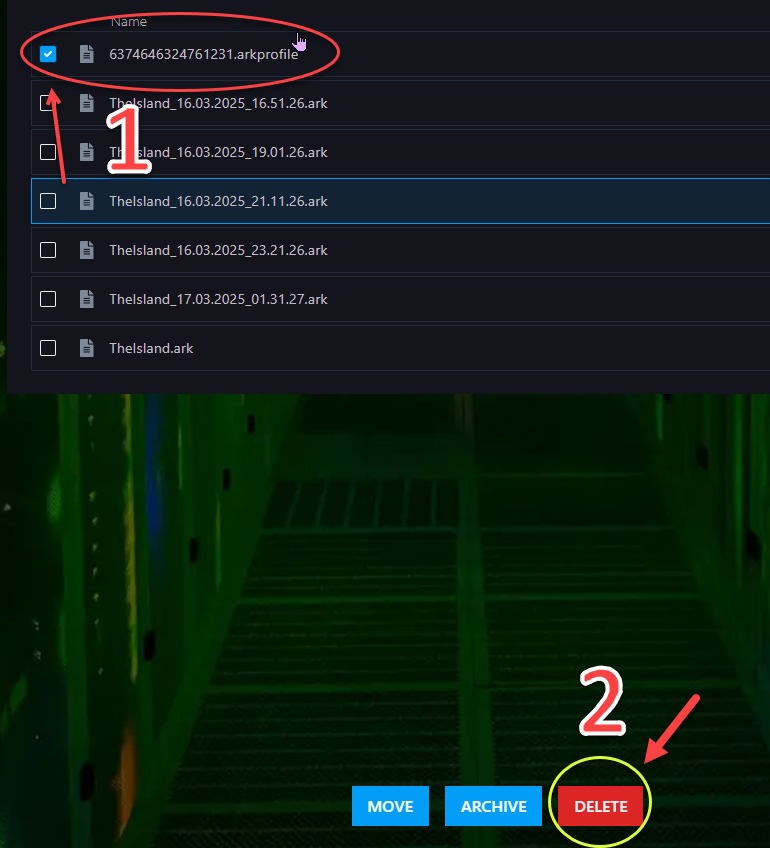
Find the file that contains the player’s Steam ID and ends with:
.arkprofile

Step 3) Select that .arkprofile file and click DELETE, then confirm the deletion.
Step 4) Return to the Console and start your server again.

That player’s data has now been reset, and they will be able to start fresh the next time they join.
