How to find SteamID or EpicID
Whether you want to add a player to the whitelist, grant specific permissions, or simply ban someone, you will need to know the player’s ID. In this guide, we explain how to find a player’s ID by following the steps below.
HOW DO I FIND A STEAMID64?
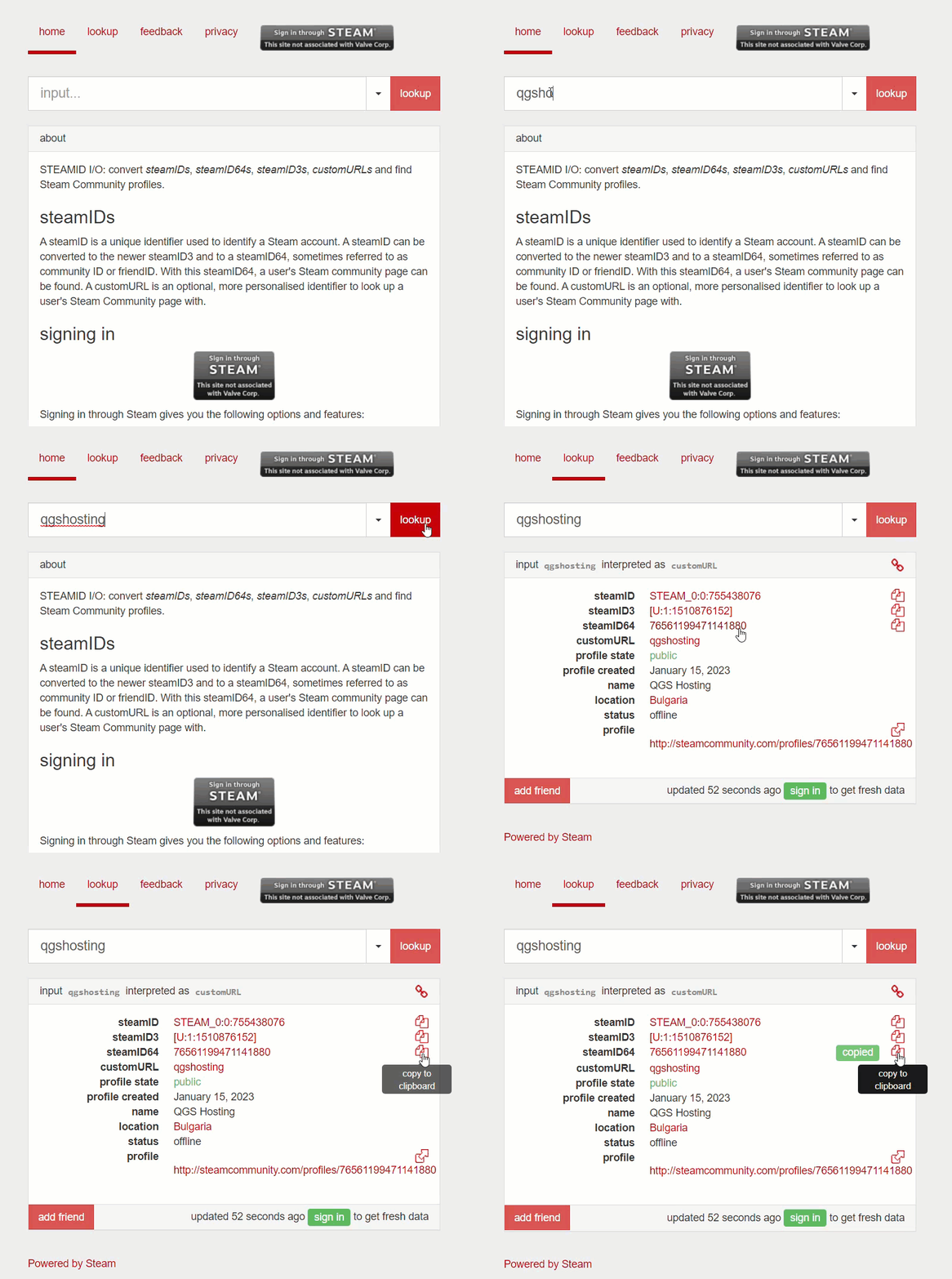
Step 1) Go to STEAMID.IO and enter one of the following details for the specific account: Steam username, Steam profile URL, SteamID, or SteamID3. Then click Lookup and copy the SteamID64.
HOW DO I FIND AN EPIC GAMES ID (FOR ARK:SE SERVERS)?
Epic users have a different ID for each device they connect from. At the moment, Epic Games does not provide a static ID, so players may need to be added to the whitelist more than once if they connect from a different device or if their ID changes.
Step 1) Launch the Epic Games version of ARK:SE and enter SinglePlayer mode.
Step 2) Press TAB to open the console, type the following command: admincheats listplayers, and press ENTER.
Step 3) Copy the displayed player ID.
