How to Enable Crossplay on your ARK Server
What is Crossplay?
ARK supports crossplay between Steam and Epic Games players.
If crossplay is disabled, only Steam players will be able to join your server. When crossplay is enabled, both Steam and Epic Games players can play together on the same server.
You can turn this option on or off at any time from your server settings.
Step 1) Open your Console, select your server, and stop it using the STOP button.

Step 2) Once your server is stopped, open SETTINGS.

On the bottom-right side of the page, you will find a toggle called CROSSPLAY.
Use this toggle to enable or disable crossplay as needed.
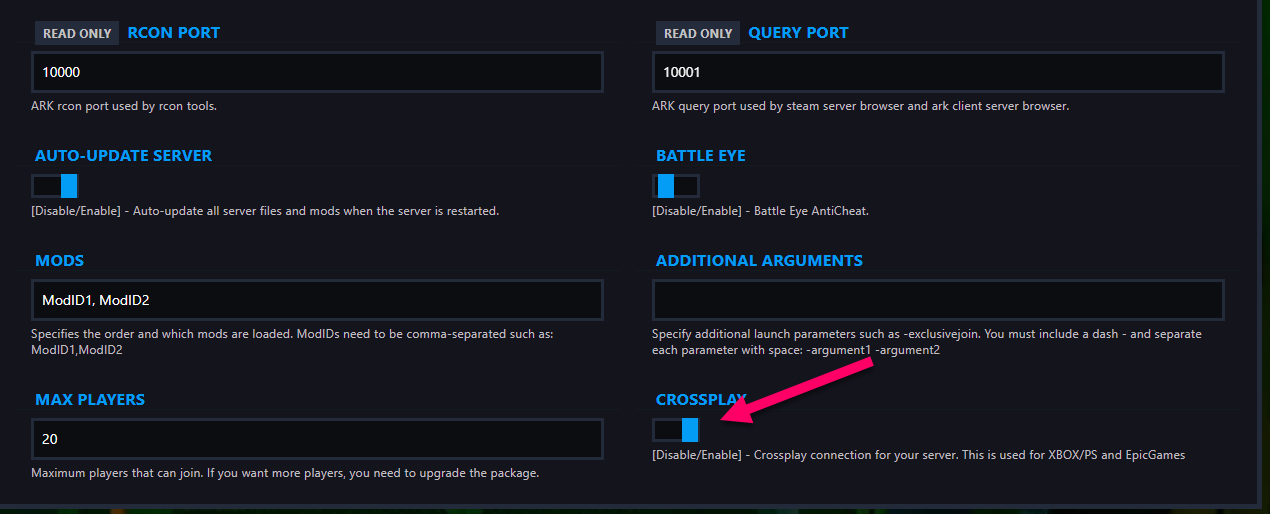
Step 3) Return to the Console and start your server again.

Steam and Epic Games players can now play together on your server.
