How to setup automatic server wipes on your Rust server
Automatic wipes let you reset your Rust server on a schedule. This helps keep the map fresh, improves server performance, and gives both new and returning players a fair start.
Automatic wipes permanently delete all world and player data, including bases, inventories, and progress. Make sure you choose your wipe schedule carefully and let your players know in advance.
You can read more about Rust wipe timers on the official wiki here.
Step 1) Open your console, select your server, and stop it using the STOP button.

Step 2) Once your server is stopped, open SETTINGS.

Scroll down to the bottom of the page until you find the wipe schedule fields:
- WIPE TYPE INFO
- WIPE DAY INFO
- WIPE HOUR INFO
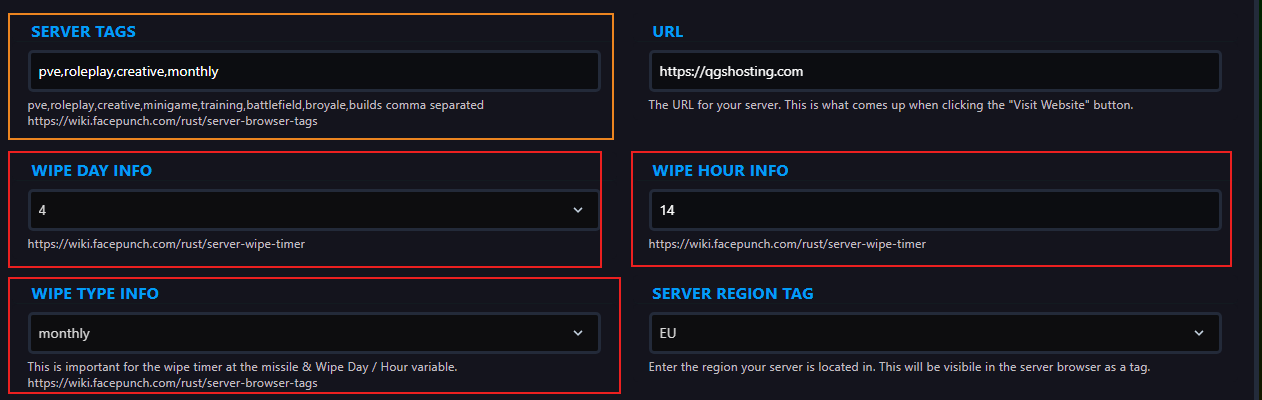
These fields control how often your server wipes and when the wipe happens.
What each field does
-
WIPE TYPE INFO sets how often wipes happen:
MonthlyBiweeklyWeekly
-
WIPE DAY INFO sets the day of the week:
0= Sunday1= Monday2= Tuesday3= Wednesday4= Thursday5= Friday6= Saturday
-
WIPE HOUR INFO sets the time of day in 24-hour format
19= 7:00 PM14.5= 2:30 PM
Example configurations
| Wipe Type | Wipe Day | Wipe Hour | Description |
|---|---|---|---|
| Monthly | Thursday (4) | 14.5 | Wipes on the first Thursday of every month at 2:30 PM |
| Monthly | Monday (1) | 9 | Wipes on the first Monday of every month at 9:00 AM |
| Weekly | Thursday (4) | 18 | Wipes every Thursday at 6:00 PM |
| Biweekly | Sunday (0) | 23 | Wipes every other Sunday at 11:00 PM |
| Biweekly | Thursday (4) | 19 | Wipes every other Thursday at 7:00 PM |
Step 3) In the SERVER TAGS field, make sure your wipe schedule is also added as a tag:
monthlyweeklybiweekly

You can read more about editing server tags here.
Step 4) Return to the console and start your server again.

Your automatic wipe schedule is now configured.
