How to change version on your Minecraft server
Changing your Minecraft server version allows you to match the version your players need, use specific plugins or mods, or update to the latest release. Whether you want to upgrade to a newer version for fresh content or switch to an older one for compatibility, it is important to do it carefully to avoid issues with your world, plugins, or server files. This guide will show you how to change your server version safely and with as little risk as possible.
If you are unsure which one to choose, start with Purpur for plugins or Fabric/Forge for mods. These are the most common and easiest to find support for.
Before you continue, make sure to create a full backup of your server files.
If you need help with that, follow this guide: How to Create a Backup for Your Server
How to install new version
Step 2) Go to the console > click on your server > and click "STOP"

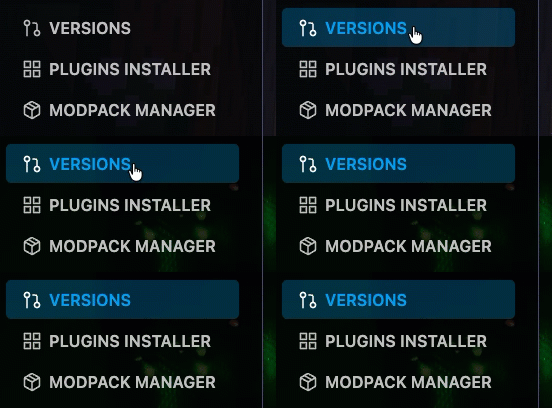
Step 2) When your server is stopped, navigate to "VERSIONS"
Step 3) Choose the version you want > click on the version and click INSTALL
In install section you will see Wipe server files and Accept EULA checks
You can click "Wipe server files" if you want to delete all server files, if you dont want, you can just leave and don't touch.
For Accept EULA you can click if you wipe the server and want to accept the EULA
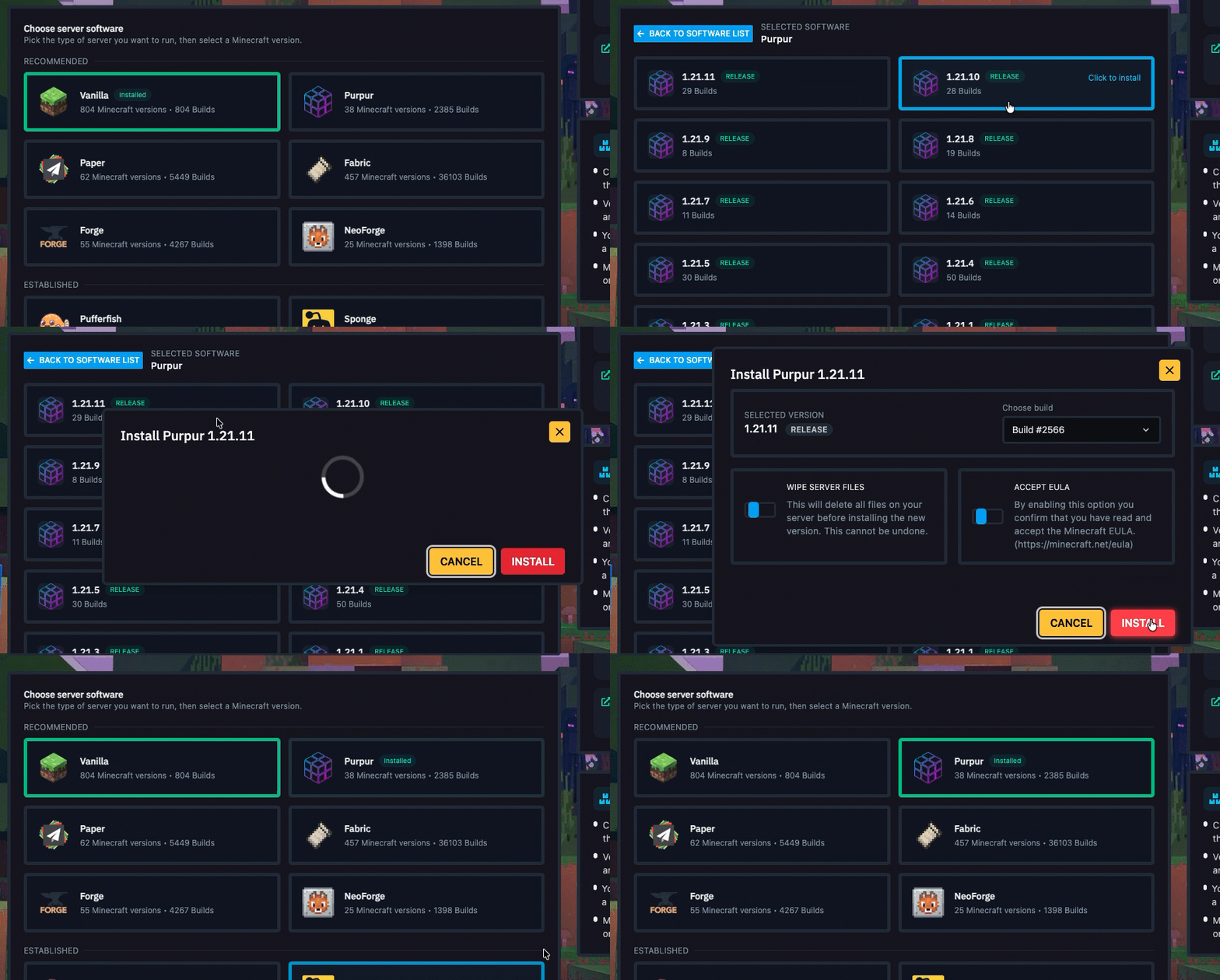
Step 4) Return to the main panel and click START to generate or load your version

How to update current version
When a new version of the game is released, for example updating from 1.21.10 to 1.21.11, you may want to upgrade your server without losing your existing progress. This tutorial will show you how to update your server version safely and easily.
Step 2) Go to the console > click on your server > and click "STOP"
Step 2) When your server is stopped, navigate to "VERSIONS"
Step 3) Choose the version you want to UPDATE > click on the version and click INSTALL
Do not choose Wipe server files, leave it empty if you want to not loss the progress
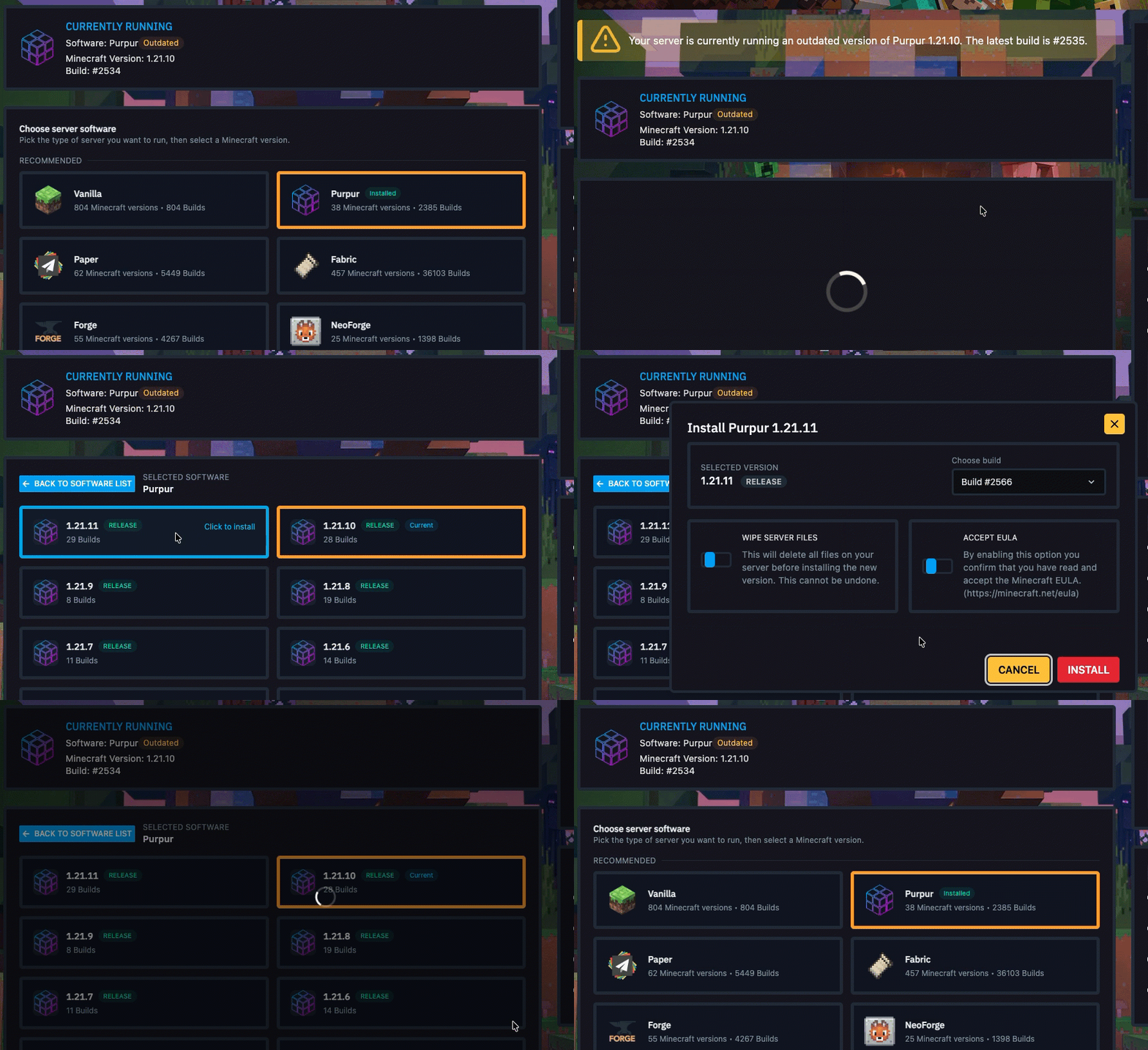
Step 4) Return to the main panel and click START to generate or load your version
Questions About Server Versions
Choosing the right Minecraft server version can be confusing, especially if you are not sure which software is best for plugins, mods, performance, or compatibility.
To make this easier, below you will find tables that group the available server platforms by their main use case. This will help you understand which versions are best for plugin-based servers and which are better for mod-based servers.
Plugin Support Platforms
These platforms are mainly used for plugins, better performance, and custom server management.
| Platform | Best For | Notes |
|---|---|---|
VANILLA | Pure Minecraft gameplay | No plugin or mod support |
PAPER | High-performance plugin servers | One of the most popular choices for plugin-based servers |
PURPUR | Plugin servers with extra features and better optimization | Based on Paper, includes more gameplay settings, extra customization, and additional performance improvements |
SPIGOT | Classic plugin servers | Stable and widely supported |
PUFFERFISH | Performance-focused plugin servers | Optimized fork of Paper |
SPONGE | Alternative plugin environments | Uses Sponge plugins instead of Bukkit/Spigot plugins |
VELOCITY | Proxy networks | Used to connect multiple servers together |
BUNGEECORD | Basic proxy networks | Older proxy solution |
WATERFALL | Improved proxy networks | Better-performing fork of BungeeCord |
FOLIA | Advanced high-performance plugin servers | Experimental and not supported by all plugins |
CANVAS | Custom performance setups | Experimental platform |
DIVINEMC | Advanced optimized plugin setups | Less common, may have limited support |
LEAVES | Extra Paper-based features | Adds more options and optimizations |
ASPAPER | Alternative Paper-style server setups | Less common than Paper or Purpur |
LOOHP_LIMBO | Limbo and fallback servers | Mostly used in proxy networks |
NANOLIMBO | Lightweight limbo servers | Good for fallback or queue systems |
Mod Support Platforms
These platforms are mainly used for mods and custom modpacks.
| Platform | Best For | Notes |
|---|---|---|
FABRIC | Lightweight modded servers | Fast, modern, and widely used |
FORGE | Large modpacks and classic modding | One of the most common choices for modded servers |
NEOFORGE | Modern Forge-style modding | Newer alternative to Forge |
QUILT | Lightweight modding with added flexibility | Similar to Fabric, but less commonly supported |
LEGACY_FABRIC | Older Fabric modpacks | Useful for older Minecraft versions |
Hybrid Plugin and Mod Support Platforms
These platforms try to support both plugins and mods on the same server.
| Platform | Best For | Notes |
|---|---|---|
ARCLIGHT | Hybrid plugin and mod servers | Supports both mods and plugins in certain setups |
MOHIST | Hybrid plugin and mod servers | Can run both plugins and mods, but compatibility may vary |
Quick Recommendations
| Goal | Recommended Platform |
|---|---|
| Pure vanilla gameplay | VANILLA |
| Best overall plugin server | PAPER |
| More optimized plugin server with extra features | PURPUR or FOLIA |
| Large modpack server | FORGE or NEOFORGE |
| Lightweight modded server | FABRIC |
| Multi-server network | VELOCITY |
| Hybrid plugins and mods | ARCLIGHT or MOHIST |
